Deciphering Claude - The new era of software engineering
This blog presumes that one has a basic knowledge on what are LLMs and their usage in the software engineering. This is written to give you a high level overview of the Claude code and a mental model to think about it. It doesn't go into the technical details.
Claude Code
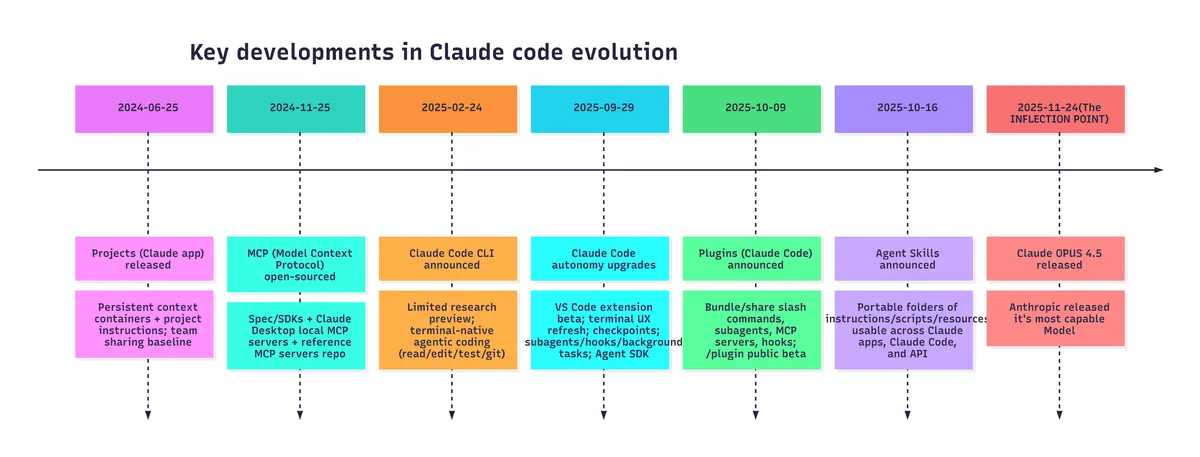
It is Feb 1st, 2026, approximately an year after Claude Code was annouced by Antrhropic. People have been using it since then and were trying interesting experiments but the real inflection point was when Opus 4.5 released. Respected people in the AI community like Andrej Karpathy started acknowledging the shift in their way of software writing.
The evolution of Claude Code
What is Claude Code?
Claude code is nothing but a piece of software(programming instructions) that gives the LLMs access to different files/tools/web/code-interpreter in a clever way.
Let me give you an analogy. Think of a software engineer, who was asked to write an application by his manager. Now this software engineer, can think about what tech stacks to use, what algorithms to use, come up with a plan. But he can't produce an application just by coming up with a plan. He needs a code editor where he can apply his idea and write code, a code interpreter that runs this code and gives him a feedback(if any error or how his application is coming out). While he writes the code, he might have to go to web and search the online documentation, look into any github issues that could provide a solution for his bug and so on. So, basically, he has to take actions that will bring the application into the real world from his mind.
Now, instead of the software engineer, let's say, the manager decides to use an LLM(GPT/opus/llama). This LLM, like the software engineer, can think, reason and come up with a plan. But the LLM also, like the software engineer, should take actions. This is exactly where Claude code comes in. Claude code uses features like projects, skills, mcp-server, plugins, hooks to help the LLM take the actions and achieve what it wants, in our example, developing the application.
What are these features?
1) Prompts:
Let's start with prompts. This is the starting point for any user. You need something and you go to LLM and type out your question. If you also think, that LLM might need to know certain things before it can answer your question, you would also type in the required information for the LLM to know along with your question. For example, you are reading a news article on the internet but you are not interested in the entire news article and all you need are the key points. So, you copy the entire news article, paste it into any LLM and ask, "Summarize this new article for me with just 5 points. Do not be too verbose". It is as simple as that.
What will we see in the following is just the same prompting to the LLM, but in an organized and systematic way.
2) Projects:
This is the first feature that was released by Anthropic. "Project" is a repo or folder where you put all the relevant files of a project or initiative that you are working on. For example, let's say, you launched a new product and you want to build a marketing strategy for it and you decide to leverage an LLM for it.
What a human would do if he has to build a marketing strategy? He first tries to understand the product specs, the company's competitor landscape and so on.
Similarly, the LLM also needs to understand all these. So, what you do is, upload all the relevant files related to product spec, competitor study if any. Then, you can ask the LLM to create a marketing strategy. Now, the LLM will use it's tools(will discuss about these tools later) and read the files that you have uploaded and will give you a "marketing strategy" tailored for your product.
3) Skills:
Skills are exactly what you think of. Providing the required skills to the LLM to achieve the task at hand. Let's go back to our "marketing strategy" example. Let's say your company has certain rules on how the marketing strategy needs to be formulated. For example, it should start with competitor analysis, then product spec comparisons, macro economic trends and then the final conclusion.
Now this can be added along with your question. Exactly like, "Analyse the files that I have uploaded and come up with a marketing strategy for the given product. Start with competitor anlaysis, then product spec comparisons, macro economic trends and then the final conclusion". This perfectly makes sense. But sooner or later, you will find yourself, copying the same prompt/question for different products to create the market strategy. This is exactly where the skills come in. You can simply put these instructions on how to create a marketing strategy in a file "SKILL.md" and the LLM can read this and follow the instructions exactly to create your strategy.
There could be multiple other skills as well. LLM will only load the metadata about the skill initially and then later it will decide if it has to load the entire skill depending on the requirement.
4) MCP servers:
MCP(Model Context Protocol) is nothing but a standard on how we give the LLMs access to the tools.
Tools are different from skills and projects. Say, you created a skill, basically a file with bunch of instructions. How does the LLM access it? It doesn't have a magic hand to pick up a doc and read it. The skill has to be programmatically fed into the LLM.
So, this is how a tool works. When you initialize the claude code in your project/repo, claude code feeds the metadata of the available tools(you can also define these tools using MCP) and skills to the LLM. Now, you ask a question. The LLM reasons about it and decides that a particular skill is essential to complete the given task. It goes and access this skill(file with instructions) using a tool. This tool is just a python program(or any other language of choice) that opens the SKILL.md file reads the contents and sends back to the LLM.
Similarly, like how we have a tool(python program) that gives the LLM access to a file, there can be other tools, which gives the LLM access to the internet, your mail account, your calendar and so on. You build these tools in python and wrap the tools into a MCP server. The LLM uses a MCP client to use the tools and get what it wants.
5) Hooks:
Hooks are a set of instructions(written in python) that gets executed when a pre-set condition is met. These pre-set conditions can be like, every time the LLM decides to use the web search tool or every time the LLM writes a piece of code for you.
The hooks can be configured to run unit tests everytime the LLM writes a code or can be configured to scan the web search query and flag sensitive information.
6) Plugins:
Let's say you want to create a website using Claude code. You have certain standards, like the font size to be used, font colors to be used, documentation to read. You can definitely go ahead and configure your own skills, MCP servers and hooks to give to the LLM.
But what if already some developer has worked on it and he created all the skills, MCP servers and hooks that are required to build a website and it also meets your needs. The developer can simply package all these into a plugin and publish in the official claude plugin market place, which you can install into your project and then use it with a command.
Conclusion:
Essentially, claude code is a software that has features like skills, mcp-servers, hooks, plugins which it uses to write the great code that you see. And you see the magic, when a capable model like Opus 4.5 interacts with these features.
Under the hood, all these features are just a systematic and an organized way feeding prompts to a model that is better in terms of following the instructions. With the right understanding and the combination of the LLM models and these features, one can get the maximum out of Claude code.
The capability of the Claude Code will only increase from here as the models get better and better with the instruction following and as the features increase.